
IPTV on iPhone and iPad: Best Apps and Setup Guide
Which IPTV players are actually in the UK App Store, how to log in with Xtream Codes or M3U, how to AirPlay to your TV, and how to avoid lookalike apps.
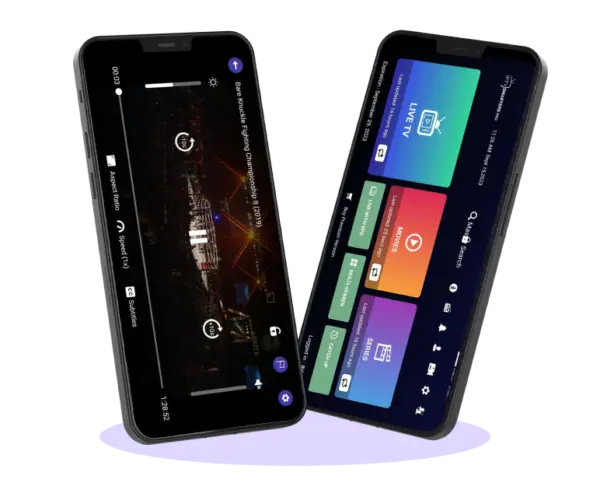
Watching IPTV on iPhone or iPad is handy for the kitchen, the garden, the commute or the spare room. Apple doesn’t make its own IPTV player, so you need a third-party app from the App Store and your subscription’s login details. This guide covers which apps are genuinely available in the UK App Store, how to set them up and how to send the picture to your TV.
What you need for IPTV on iPhone
- An iPhone or iPad on a recent version of iOS or iPadOS.
- A player app from the App Store (see below).
- Your IPTV login: an Xtream Codes username, password and server, or an M3U link.
- A decent connection: Wi-Fi is best. On mobile data, remember that an hour of HD can use a few gigabytes.
IPTV apps for iPhone in the UK App Store
We checked the UK App Store on 28 September 2026. These players were listed:
| App | Developer (as listed) | Price | Notes |
|---|---|---|---|
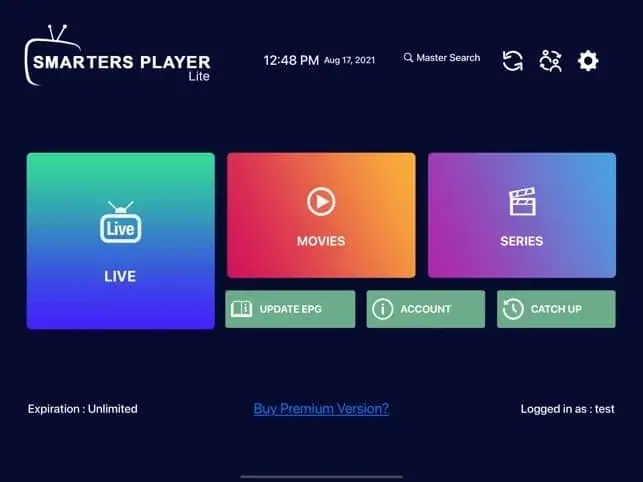
| Smarters Player Lite | WHMCS Smarters | Free | The iOS version of IPTV Smarters. Easy, supports Xtream Codes and M3U. |
| IPTVX | Bending X | Free, with optional upgrades | Polished Apple-style design, runs on iPhone, iPad and Apple TV. |
| GSE Smart IPTV Pro | GSE Technology | £2.99 | Long-standing player with lots of settings. |
| iPlayTV AIO | Andre Silva | Free | Simple layout, good for M3U playlists. |
| IPTV Player – Opus | Biel LLC | Free | Clean interface with a TV guide. |
Prices and availability change, so check the App Store listing before you install.
Beware of lookalike apps
TiviMate is not available on iPhone. Several App Store apps use similar-sounding names; they are not made by the TiviMate developer. Check the developer name before installing any player, and never enter payment details inside an app that promises free channels.
Setting up IPTV on iPhone: step by step
- Open the App Store, search for your chosen player (for example Smarters Player Lite) and install it.
- Open the app and allow it to access the local network if asked. This is needed for AirPlay and casting.
- Choose Login with Xtream Codes API (or “Add playlist › Xtream”).
- Enter a name, then your username, password and server URL exactly as your provider sent them, including
http://and the port. - Tap Add user or Save. Channels, films and series load in a minute or two.
- Update the TV guide from the settings if it doesn’t appear straight away.
If you have an M3U link instead, choose the M3U or URL option and paste it. Copying from your email or WhatsApp avoids typing errors. Our guide to the M3U playlist explains the difference, and the IPTV Smarters Pro setup guide covers the Smarters menus in detail.
IPTV on iPad
Everything above works the same on iPad, and the bigger screen makes browsing the TV guide far easier. Several players support split view, so you can keep a match on screen while you message friends.
Watching on your TV with AirPlay
AirPlay is Apple’s wireless streaming system. If you have an Apple TV or an AirPlay-compatible Smart TV (many recent Samsung and LG models are), you can send the picture from your iPhone to the big screen:
- Make sure the iPhone and TV are on the same Wi-Fi network.
- Start playing a channel in the app.
- Tap the AirPlay icon in the player, or open Control Centre and choose Screen Mirroring.
- Select your TV.
AirPlay works, but for everyday viewing a dedicated device is more reliable and doesn’t drain your phone. On Apple TV, install the player directly (IPTVX runs on Apple TV), or see IPTV on Firestick and Smart TV IPTV.
Which IPTV app for iPhone should you choose?
- Just starting out? Smarters Player Lite is free and mirrors the layout many people already know from Fire TV.
- Want the most polished experience? IPTVX feels most like a native Apple app and works across iPhone, iPad and Apple TV.
- Lots of settings and a one-off price? GSE Smart IPTV Pro.
- Mainly an M3U playlist? iPlayTV AIO keeps things simple.
You can install more than one and log in to each with the same details, then keep the one you like best.
Parental controls on iPhone and iPad
If children use the device, combine the player’s own category locks with Apple’s Screen Time (Settings › Screen Time › Content & Privacy Restrictions). Screen Time can limit which apps open and for how long, and it is protected by its own passcode.
Tips for smooth IPTV on iPhone
- Use Wi-Fi when you can. It saves your data allowance and is usually more stable.
- Lower the quality on mobile data. Pick the HD rather than 4K version of a channel when you are out.
- Turn off Low Power Mode if playback stutters; it can throttle performance.
- Keep the app updated from the App Store.
- Use favourites so your usual channels are one tap away.
Fixing common problems
The app says the login is wrong
iPhones often capitalise the first letter automatically. Check the username and password carefully, or paste them rather than typing.
Channels load but won’t play
Try switching the stream format or player in the app’s settings, and make sure you are on a stable connection.
The picture freezes
Move closer to the router, switch to the 5 GHz Wi-Fi network, or close other apps. See why does IPTV buffer for the full checklist.
Battery and data: what to expect
Video streaming is one of the most power-hungry things an iPhone does. Expect a noticeable drop in battery over a long match or film, especially on mobile data with the screen at full brightness. Plugging in, lowering brightness and using Wi-Fi all help.
Summary
To watch IPTV on iPhone or iPad, install a trusted player from the UK App Store (Smarters Player Lite and IPTVX are good starting points), log in with your Xtream Codes details, update the TV guide and add your favourites. Use AirPlay for the occasional big-screen session, and a dedicated device for everyday TV. Want a login to try it with? Ask for our free 2-hour trial or compare our plans.
Frequently asked questions
Is there an official IPTV app from Apple?
No. Apple’s TV app doesn’t play IPTV subscriptions; you need a third-party player.
Can I use the same login on my iPhone and my TV?
Yes. Check how many simultaneous connections your plan allows before watching on both at once.
Can I download programmes to watch offline?
Most IPTV players stream only and don’t offer offline downloads. Plan to watch on Wi-Fi or with enough mobile data.
Why does the picture keep dropping to low quality on mobile data?
Mobile signal changes as you move. Some players lower the quality automatically to avoid freezing. Choosing the HD version of a channel, rather than 4K, usually gives a steadier picture on the go.
Are IPTV apps for iPhone legal?
The players are legal apps. Whether content is legal depends on the service you use; see is IPTV legal in the UK.
Keep reading
What Is IPTV? A Plain-English Guide for UK Beginners
IPTV explained without the jargon: how internet TV works, what you need, what it costs, the difference between apps and subscriptions, and the questions to ask before you pay anyone.
Is IPTV Legal in the UK? An Honest Answer
The technology is legal; some of what is sold with it is not. A clear explanation of UK law, the risks for viewers, how to spot a legitimate service, and where we stand.
IPTV Smarters Pro Setup: Step-by-Step on Every Device
How to install IPTV Smarters Pro on Firestick, Android, Smart TV and iPhone, log in with Xtream Codes or M3U, load the TV guide and fix the errors people hit most.

Not sure which plan? Ask us first
Tell us your device and your broadband speed and we will tell you honestly what to expect from cheap IPTV UK streaming before you pay a penny.